Session 1 · Discovery
Find every instance of a neuron type across all datasets
The ontology gives each cell type one name, so a single query spans FlyWire, hemibrain, BANC, male-CNS, MANC, optic-lobe and CATMAID datasets at once.
Key question: Find all instances of a neuron type across every dataset.
Route A: Python API
First time? Set up Python → Open this session in Colab
Use vfb.get_instances() to search for a neuron type by name. The ontology gives each cell type one name, so a single query spans FlyWire, hemibrain, BANC, male-CNS, FAFB and CATMAID datasets at once.
from vfb_connect import vfb

df = vfb.get_instances("DA1 lPN", return_dataframe=True)
print(f"Found {len(df)} instances")
print(df['data_source'].value_counts())
print(df[['id', 'label', 'data_source']].head())
Verified output (vfb_connect 2.4.2 against live VFB, Aug 2026):
Found 68 instances
[BANC]    18
[fw]      15
[fafb]    15
[mc]      13
[hb]       7

          id                                       label  data_source
VFB_001052v1                 BANC_626:720575941624135932       [BANC]
VFB_fw035057   AL.MB_CA.108 (FlyWire:720575940637208718)         [fw]
VFB_00101203  Uniglomerular mALT DA1 lPN#R8 (FAFB:57381)       [fafb]
VFB_jrchjtdd             DA1_lPN_R (FlyEM-HB:5813039315)         [hb]
VFB_jrmc37h0                   DA1_lPN_L (MaleCNS:11721)         [mc]
68 registered images, ~8 biological cells per hemisphere — records, not neurons. The id column is the reproducibility currency for every other route.
Route B: R (via reticulate)
First time? Set up R + vfb_connect → Open this session in Colab (R)
The same vfb_connect engine drives R through reticulate — one import line and every call from the Python route works, returning ordinary R data frames.
library(reticulate)                     # needs a current reticulate (see setup)
vfb <- import("vfb_connect")$vfb        # first call connects (~2 min), then fast

df <- vfb$get_instances("DA1 lPN", return_dataframe = TRUE)
nrow(df)
table(sapply(df$data_source, paste, collapse = ","))
head(df[, c("id", "label")], 3)
Verified output (R 4.3 + reticulate 1.46 + vfb_connect 2.4.2, Aug 2026):
[1] 68

BANC fafb   fw   hb   mc
  18   15   15    7   13

            id                                     label
1 VFB_001052v1               BANC_626:720575941624135932
2 VFB_fw035057 AL.MB_CA.108 (FlyWire:720575940637208718)
3 VFB_fw033192 AL.MB_CA.128 (FlyWire:720575940621239679)
Identical numbers to the Python route — same package underneath. Columns holding lists (like data_source) arrive as R list-columns; sapply(..., paste) flattens them for table()/dplyr.
Route C: MCP Tool
First time? Connect the VFB MCP to your AI →
Point any MCP-capable assistant (Claude Desktop, Claude Code, Copilot…) at https://vfb3-mcp.virtualflybrain.org (setup guide
) and it answers this with two tool calls. Here is a real transcript:
You: Search VFB for the neuron type ‘DA1 lPN’ and list every individual neuron across all datasets, with their dataset and VFB ID.
Assistant →
search_terms("DA1 lPN")→ exact match FBbt_00067363 →get_term_info(FBbt_00067363)→ available queries include ListAllAvailableImages (count 68) →run_query(FBbt_00067363, ListAllAvailableImages)Assistant: VFB holds 68 registered images of adult antennal lobe projection neuron DA1 lPN, from four connectomes: Male CNS v0.9 (Berg 2025) — e.g. DA1_lPN_L (MaleCNS:12314)
VFB_jrmc37ha, DA1_lPN_R (MaleCNS:13064)VFB_jrmc37h9; hemibrain v1.2.1 — e.g. DA1_lPN_R (FlyEM-HB:1734350908)VFB_jrchjtdb; FlyWire v783; and FAFB-CATMAID. Each row carries the dataset, template space, licence and a link back to the source (neuPrint / Codex / CATMAID). Note these are image records, not cells — the class definition gives ~8 per hemisphere.
The tool results come back as structured tables with IDs, so the assistant can hand you exactly what vfb_connect needs — no copy-typing.
Example Prompt
Search VFB for the neuron type 'DA1 lPN' and list every individual neuron across all datasets, with their dataset and VFB ID.
Route D: VFB Chat
Nothing to install — tips before you start →
VFB Chat provides a zero-install way to discover neurons. It stays focused on Drosophila neuroanatomy and answers from VFB’s data.
Optimized prompt: Keep it to one plainly-named entity per question — short questions resolve best.
Route E: 3D Circuit Browser
Nothing to install — how the viewer works →
The Circuit Browser turns discovery into three clicks: find the type, run one query, and get every registered image across datasets — with thumbnails you can drop straight into the 3D viewer.
Find the type. Click the magnifying-glass icon (top right) and type DA1 lPN. Suggestions appear as you type, with coloured facet tags that separate classes, individual neurons and brain regions; the exact match sorts to the top. Pick DA1 lPN (FBbt_00067363) — or use the button below to open the same term page directly.
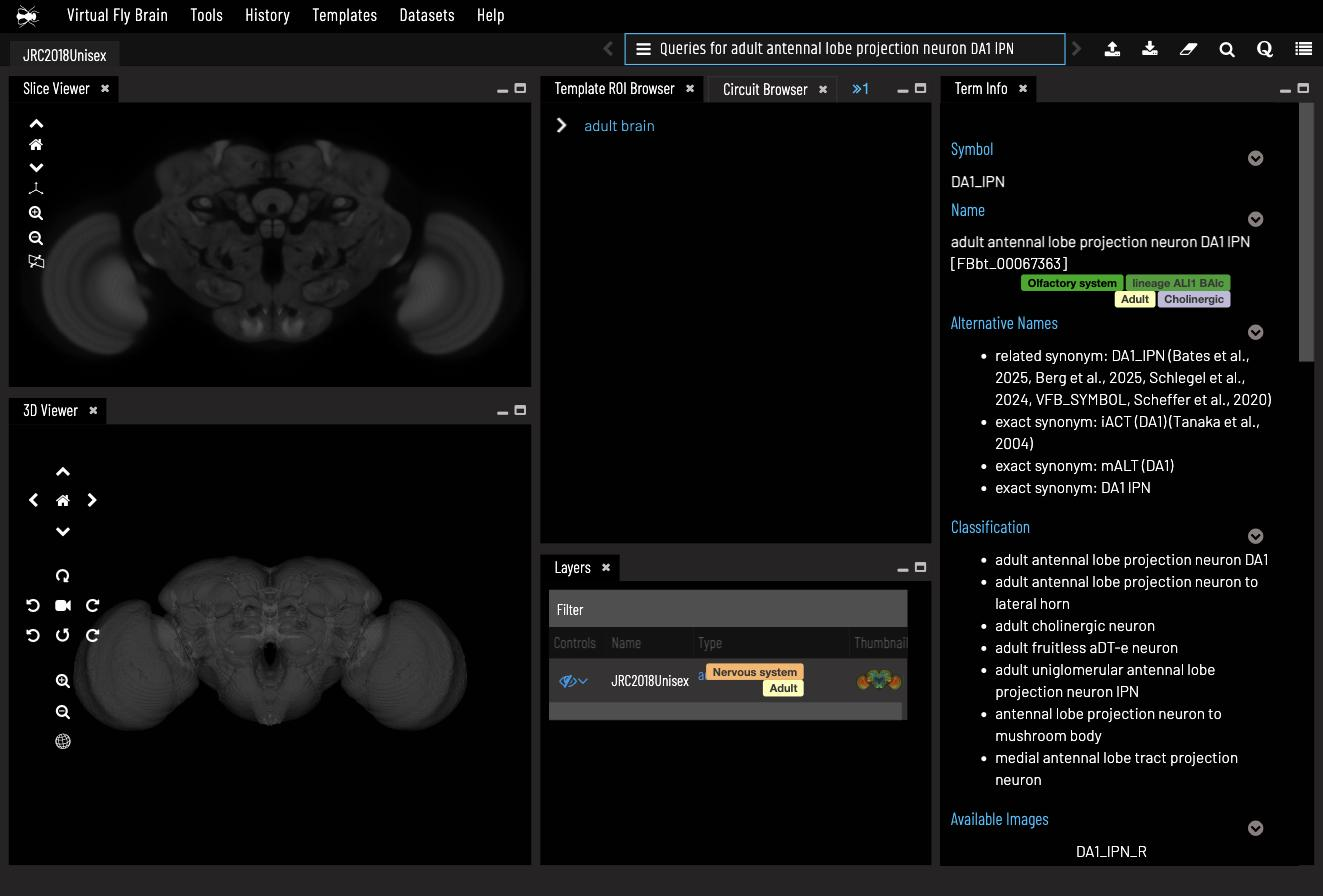
Read the term page. The Term Info panel (right) shows the full name and FBbt ID, synonyms from the literature, its classification, and tags like Olfactory system and Cholinergic. This is the same ontology record every other route uses — one name, every dataset.
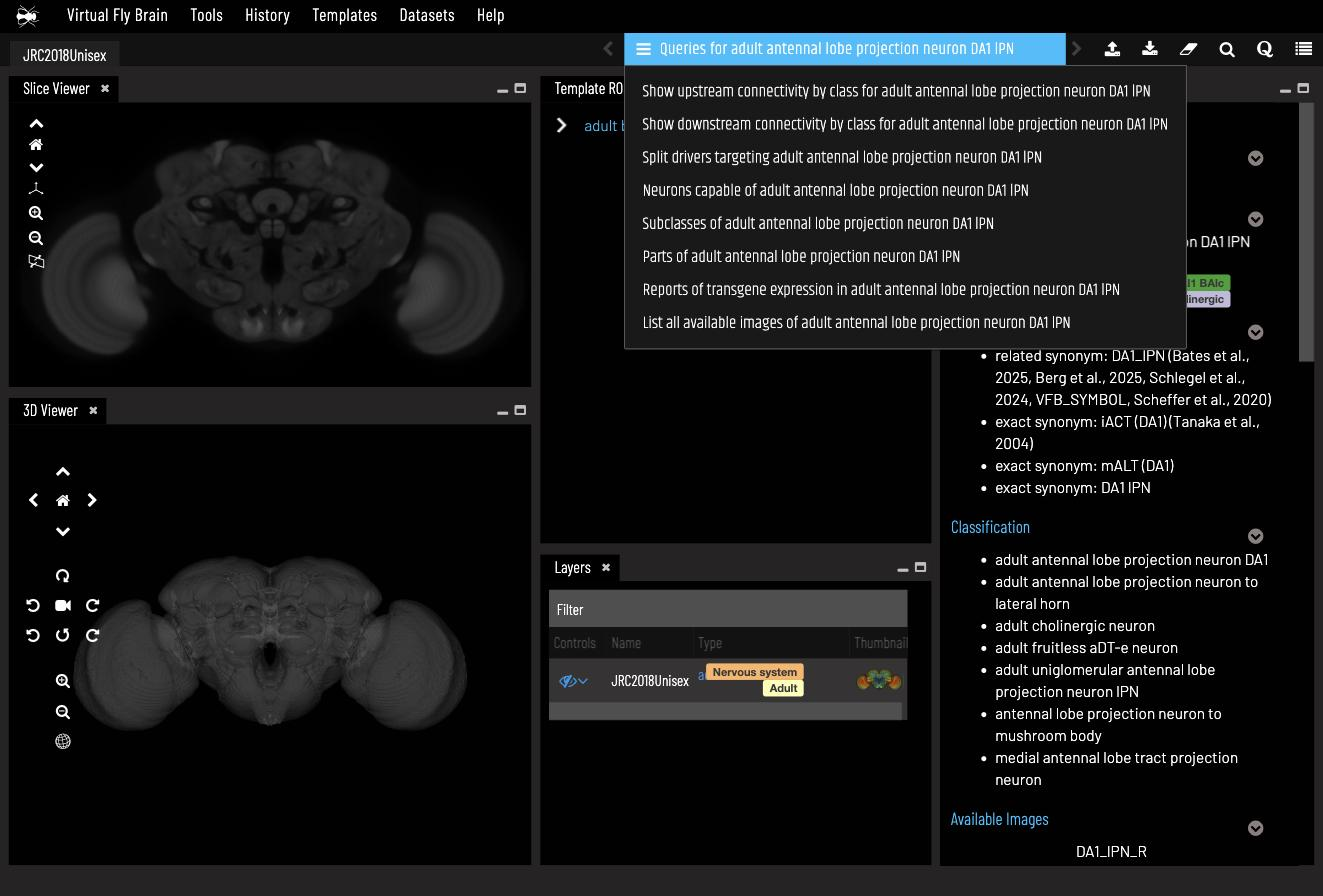
Open the query menu. Click the Queries for adult antennal lobe projection neuron DA1 lPN bar at the top. Every query VFB can run on this class is listed — connectivity by class, driver lines, subclasses, expression reports, and the one we want: List all available images of adult antennal lobe projection neuron DA1 lPN.
Run it. The results panel reports 68 rows — every registered DA1 lPN image — with the dataset each comes from (Male CNS, hemibrain, FlyWire, BANC…), its template space, licence and a thumbnail. Type in Filter Results to narrow, click a column header to sort, or Download results (CSV) to take the table into Python.
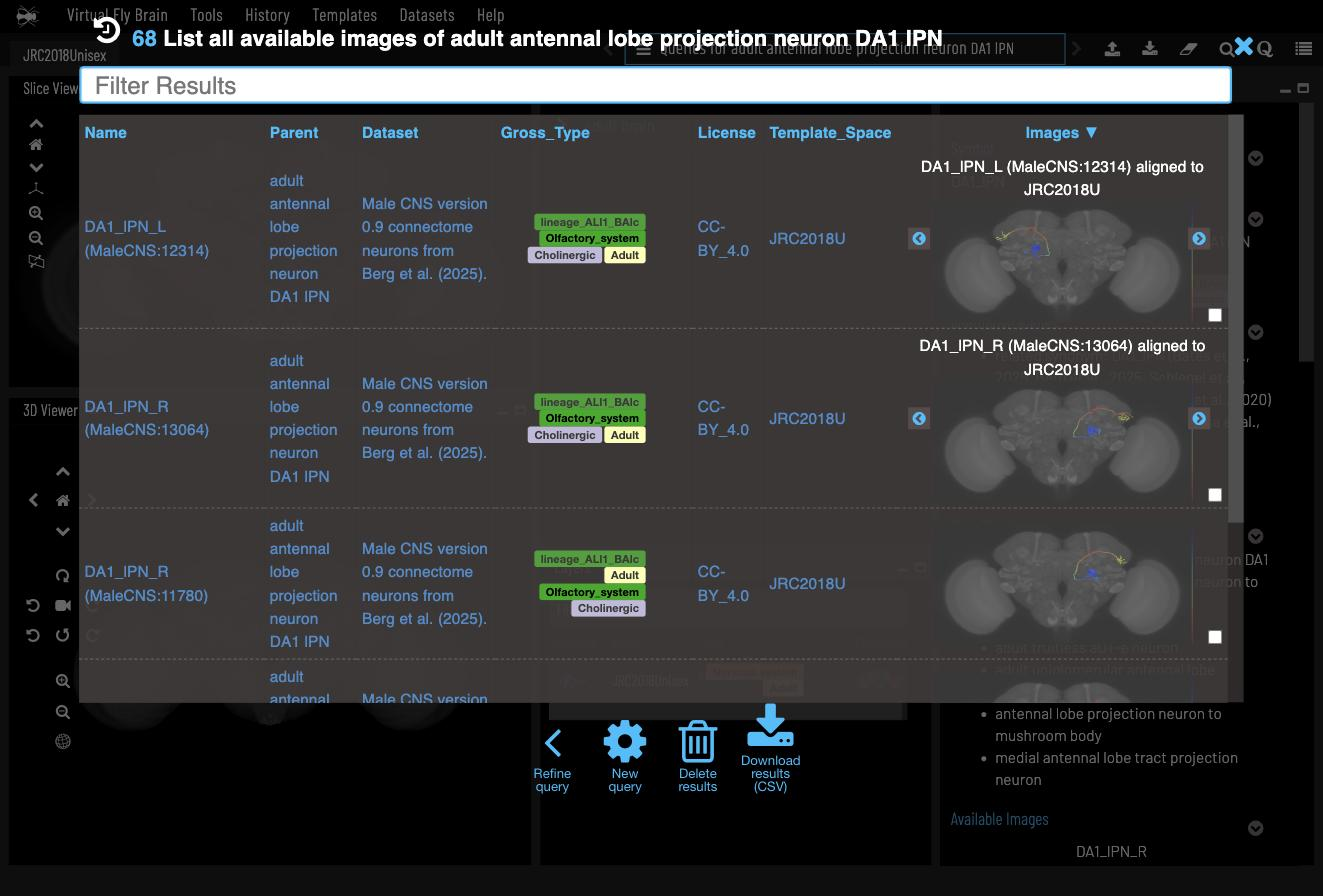
Tick the checkbox on any row to load that neuron into the 3D viewer, then close the results with the blue ✕.
Worth noticing: 68 is the number of registered images, not cells — the ontology definition says ~8 DA1 lPNs per hemisphere. Records, not neurons: the same lesson as the Python route.
Try It Next
All of these are known to work — run them yourself and see what changes:
- Scale shock (Python):
vfb.get_instances("alpha/beta Kenyon cell")returns 7,212 records to DA1 lPN’s 68. Which datasets contribute the most, and why might a numerous cell type be less completely catalogued? - Chat: ask “What is DA1 lPN?” for the ontology view with literature sources — then follow one of the EXPLORE chips it offers.
- Browser: on the DA1 lPN term page, run Subclasses of adult antennal lobe projection neuron DA1 from its parent type to meet the sibling glomerular types.
When to Reach for Which Route
- Chat to find the right name fast and get oriented
- MCP when you want conversational search with structured output
- Python API when you need the full table for downstream analysis and reproducibility